
Help customers who can't speak talk to your staff
Customers scan a QR code at your counter, desk or table. A communication board opens in their phone's browser and speaks for them, in their own language. Nothing to install, no hardware to buy.
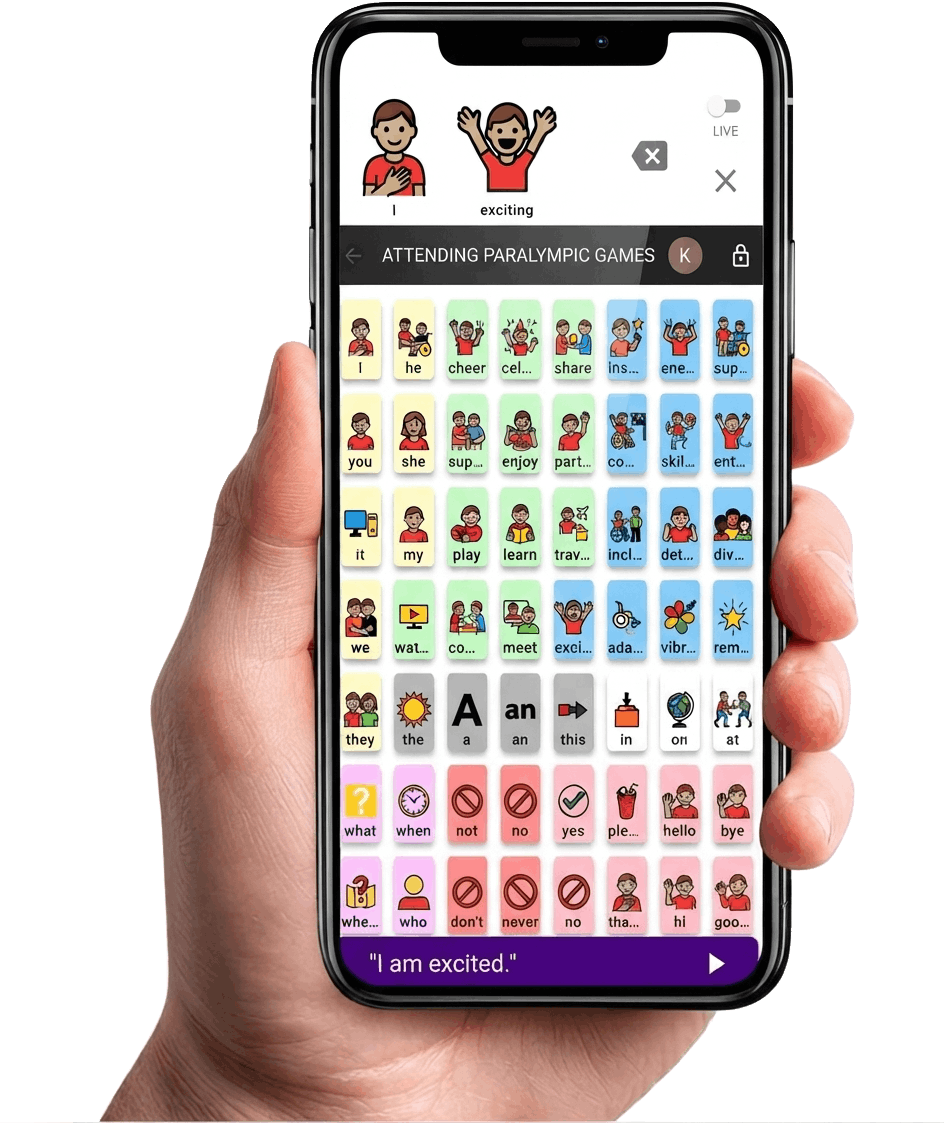
Scan, tap, speak
Scan
A customer scans the Cboard QR code at your entrance, front desk, table or counter with their phone camera.
Tap
A board made for your venue opens in their browser, in their language. A restaurant gets a menu board, a hotel gets a check-in board, a pharmacy gets a pharmacy board.
Speak
They tap pictograms or words and the phone says the message out loud, so they can talk with your staff directly.
A real communication tool, on the customer's own phone
Cboard started as an app for people who cannot speak. Cboard Access puts the same tool at your point of service.
No download, no login
The board opens in the phone's browser. There is no app to install and no account to create.
Real AAC, built for people who cannot speak
Cboard is an augmentative and alternative communication (AAC) app. People who cannot speak use it every day, at home, at school and at work.
46 languages
Every board works in 46 languages with neural text-to-speech, which also helps international visitors.
It stays with the customer
Customers can keep using Cboard after the visit, anywhere they need it.
 Communication Inclusive Space – Powered by Cboard
46 languages, with natural-sounding voices
Customers pick their language on the board. The same QR code works for locals and for visitors from abroad.
Support your duty to communicate effectively
Under the ADA, businesses and public bodies must communicate effectively with people with disabilities, including people with speech disabilities. Cboard Access supports that duty at the point of service; it does not, on its own, make a venue ADA or EAA compliant.
Scan a live demo
Open a real Cboard Access board on your phone, just as your customers would.
TBD Demo site 1
Demo link coming soon
TBD Demo site 2
Demo link coming soon
How setup works
We do the work. Your team joins a discovery call, reviews the boards and attends training.
- 1
Communication audit
We map where customers talk to your staff, the most common requests and the languages your customers speak.
Discovery callVenue mappingLanguage profile - 2
AI board design
Cboard's AI tools draft boards for your context (menu items, rooms, services). We then refine them with you, in your customers' languages.
AI board generationCustom pictogramsMultilingual layout - 3
QR deployment
We deliver print-ready QR assets for tables, counters, windows and reception, plus the badge kit for your entrance and website.
Print-ready QR assetsBadge kitPlacement guidance - 4
Staff training
Three 30-minute virtual sessions (90 minutes total) show your front-of-house team how to recognize a Cboard user and support the conversation naturally.
3 × 30-minute virtual sessionsAAC awarenessQuick-reference card - 5
Measurement
Anonymized usage data shows which boards and tiles are used most. We review boards regularly to keep them accurate as your services change.
Anonymized analyticsBoard reviewsImpact reporting
Show customers they will be understood
Venues that meet the criteria display the Communication Inclusive Space – Powered by Cboard badge at the entrance, on their website and on their signage.
A venue can display the badge when:
- Boards are live at all agreed touchpoints
- At least [TBD]% of front-of-house staff completed training
- Boards are reviewed at least once a year
Communication Inclusive Space – Powered by CboardA setup fee, then a fee per QR
One QR covers one service touchpoint, and reprints are free. Prices in USD.
Event
Conferences and festivals
$1,000 setup
+ $100 per QR, per event
- A board set for every event zone (up to 5 zones)
- Volunteer training and quick-reference card
- Printed boards for offline zones
- Anonymized impact report
- Repeat editions pay the per-QR fee only, with no new setup
Single site
One location, up to 5 QR
$1,500 setup
+ $100 per QR, per year
- Up to 5 custom boards
- 46 languages
- Sticker and badge kit
- Staff training: three 30-minute virtual sessions
- Anonymized analytics
- Four board updates a year
- If the same owner or brand has 2 or more sites, Multi-site applies
Multi-site
Chains, banks, transit
$4,500 setup
+ $50 per QR, per year
- Unlimited boards
- Board update dashboard
- Your brand colours
- Impact reporting
- Priority support
- Minimum 10 QR and $1,000 per year
Sponsored
Venues funded by a sponsor
$0 for the venue
The sponsor pays the tier's list price + 50%, for setup and per QR
- The app shows "Sponsored by [name]" and the sponsor's logo
Where it is used
Events
Conferences, sports events and festivals. Book at least 15 days ahead and every zone gets its own board.
Learn more: EventsMunicipalities
Parks, libraries, transit and city services. Let residents who cannot speak choose their own way to communicate.
Chains
Restaurants, retail, banks and hotels across many locations, with boards managed centrally.
Healthcare
Clinics, pharmacies and front desks, for short everyday exchanges. It does not replace interpreters for complex conversations such as medical consent.
Privacy and open source
We only collect anonymized usage data. Customers never create an account. The code is open source.
Privacy and accessibility detailsFrequently asked questions
The board runs in the phone's browser, so it needs mobile data or Wi-Fi. For areas with weak or no connectivity, we provide printed boards as an offline fallback.
No. Most customers use their own mobile data. If your venue has poor coverage, guest Wi-Fi helps, and printed boards cover the rest.
46 languages, with neural text-to-speech. Customers can switch language, so international visitors are served too.
It depends on how many touchpoints you have. Setup covers an audit, board design, QR deployment and three 30-minute virtual training sessions (90 minutes total). For events, we need at least 15 days.
No. No single product does that. Cboard Access supports your duty to communicate effectively with people with speech disabilities in short, everyday service exchanges. It does not replace interpreters or other aids for complex exchanges such as medical consent.
Yes. The board shows "Sponsored by [name]" and the sponsor's logo in a small strip at the edge of the board. Sponsor logos never appear on communication tiles, are never spoken by text-to-speech and never reduce the size or number of tiles.
Anonymized usage data only, such as scans, board views and tiles selected. Customers never create an account or share their name or contact details.
Try it on your own phone
Book a demo to try Cboard Access on your own phone, or fund a deployment for a venue in your community.